
Hello!
Yesterday I published a survey to find out what you are having problems and what causes you problems when you try to make money online. Thanks to everyone who has already passed a poll soon I'll begin to answer your questions in future articles. Who has not gone through the survey, are invited to participate. Here
And in this article I will write detailed instructions on how to do a poll on the website. Conduct a survey on its website to help great service from Google - Google Forms. I do not know about you, but I have recently been using more and more services Google, unlike Yandex. To be able to use any of the services Google, you need to register a mailbox on gmail.com.

- First, go to the site Google. In the upper right corner of the icon will be 9 small cubes, click on it. In the menu, select "Disk".
- On the next page, click on the red button "Create":
- The drop-down menu, select "Form":

- In the next step, and the title of the survey, select the graphic design:

- Now draw up a list of questions and answers to them:

- The picture above shows one arrow to choose "types of questions." If you open it, you will be prompted to choose different types of responses. Survey participants can be asked to choose one from the list of answers, multiple answers, ticking, write your answer in the space provided, and so on.
- To add another question to the survey, click on the "Add new item". Once you have received a list of questions, write in the "Edit confirmation" the phrase sees party at the end of the survey. It can be just a word of thanks or can add a link to this page with a gift. Upon request, you can tick the box in the last two points: to publish the results and allow edit answers. Then click on the "Send" button.
- It now remains to add a poll to your site. After clicking submit, a window like the one below. Link will be available on the poll which you can immediately share on social networks or send it by e-mail. This link will open a poll on the site Google. But we need to get the code to paste on the survey site. So click on the button "Embed".

- The following code will be opened window. But, before you place a poll on the website, a survey form dimensions: height and width. If you guess right with the size, they can always edit in the code after it is inserted.

- At the top is the menu for surveys. Monitor the statistics and see the participants' responses, the survey took place, you can see the answers.
- The drop-down menu, select "Summary of responses."
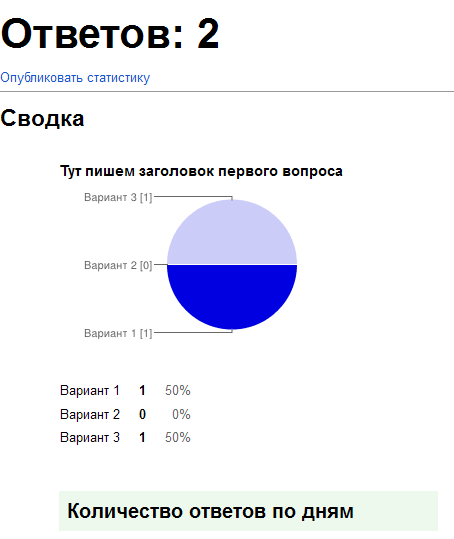
- The summary page of answers, you will see something like this. In a chart will present the results of questions that the user selects one of the options.
That's all the instructions showing how to create a poll on this site. Hopefully you will not have difficulties, and you can easily spend online poll on its website. Well, if you have questions, ask them in the comments.


0 comments:
Post a Comment